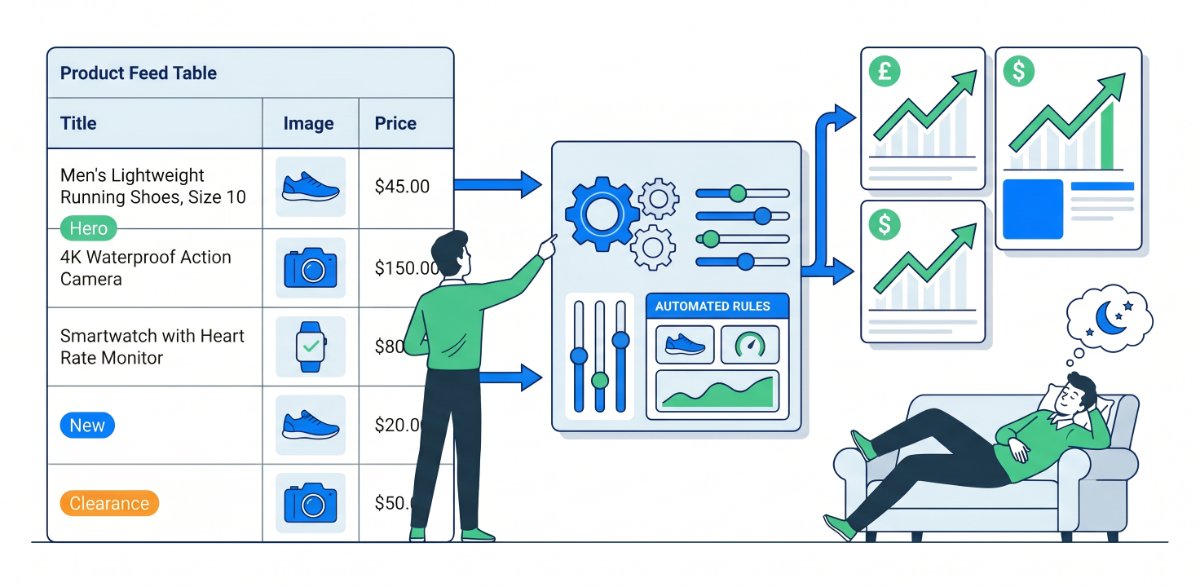
Most brands treat their product feeds like static files. They upload once a day, fix the odd error, and move on. Meanwhile, the catalog keeps changing, demand keeps shifting, and ad platforms keep guessing what to show. Dynamic feed optimisation flips that around. You set rules that respond automatically to performance, stock, and seasonality so the feed quietly gets smarter 24/7.
This post walks through how to build those rules so your feed behaves like a living system instead of a dusty spreadsheet.
Start with clear business goals, not just cleaner data
Dynamic optimisation is not about making the feed “prettier.” It is about enforcing your commercial priorities automatically.
Decide upfront:
- Which products deserve more visibility because they have great margin or conversion rates.
- Which products should be throttled or excluded because they waste spend or are always low on stock.
- How you want to treat seasonal ranges, new arrivals, and clearance stock differently.
Once those priorities are clear, rules become simple: they translate commercial decisions into automatic feed edits and campaign signals.
Use rules to promote your genuine heroes
Every catalog has heroes. Dynamic rules make sure they are the ones getting the most chances to show.
Examples of “hero” rules:
- If a product has converted above a target ROAS or conversion rate over the last 30 days, tag it as “Hero” or “Top Performer”.
- If a product sits in your top 10 percent by revenue or profit, assign it a “High Priority” label.
You can then:
- Allocate more budget or higher bids to campaigns that target “Hero” or “High Priority” items.
- Give these products more aggressive placements across channels.
Instead of manually checking analytics and promoting winners, the feed does it on your behalf.
Automatically downweight products that drain budget
On the flip side, some products attract clicks but almost never convert. Leaving them in your prime campaigns unchecked is a quiet tax on performance.
Dynamic rules can:
- Detect products with high spend and low or zero conversions in a recent window.
- Apply a “Low Performer” label or move them into a lower priority feed segment.
- In some cases, exclude them entirely from certain campaigns or channels.
This way, under‑performers do not keep soaking budget. The system steadily shifts focus towards items that justify their ad spend.
Tie rules to stock and availability
There is little value in aggressively pushing products that you cannot fulfil. Dynamic optimisation can keep feed entries aligned with inventory reality.
Useful stock rules include:
- If stock drops below a certain threshold, move the product from “Hero” to “Protect” so bids are reduced or it appears less often.
- If a product is out of stock, mark it as such immediately and, where appropriate, exclude it from Shopping or catalog campaigns.
- If stock rises significantly for a previously limited product, remove any protective flags so it can scale again.
These rules prevent you from paying for clicks you cannot monetise and help avoid policy problems from mismatched availability.
Use seasonality and events as rule triggers
Your catalog does not have the same priorities in April as in November. Rules let you adjust your feed automatically for seasons and events.
Examples:
- Tag products as “Summer”, “Winter”, “Back to School”, or “Gifting” and have separate rule sets for each label.
- Before a major event such as Black Friday, automatically push sale prices, promotional messaging in appropriate fields, and flag “On Sale” items with a dedicated label.
- After the event, revert prices and labels without manually touching every SKU.
This keeps your feed aligned with your calendar without rebuilding campaigns from scratch each time.
Enrich and clean data at scale, not by hand
Dynamic rules are also perfect for cleaning and enriching messy product data.
You can:
- Standardise colours by mapping variations like “Blk”, “Black Colour”, and “Charcoal” to a consistent set.
- Add missing attributes where patterns exist, for example setting gender to “Women” when product type includes “Womens” or “Ladies”.
- Append or adjust titles based on other fields, like adding “Pack of 3” when a quantity attribute equals three.
This improves both your reporting and how platforms understand your catalog, without endless manual editing.
Let rules drive campaign structure and bidding
When your feed is rich with meaningful labels, you can align your campaigns to those labels rather than hand‑picking products.
For example:
- Build one set of campaigns targeting “Hero + High Margin” products with more budget and tighter ROAS targets.
- Use another set for “New In” products with exploratory budgets to gather data.
- Place “Low Performer” or “Clearance” products into low‑priority, lower‑bidding campaigns that hoover up opportunistic conversions without burning cash.
As rules update labels nightly or even hourly, your campaign structure stays in sync with reality.
Monitor the rules so they do not go rogue
“Set and forget” should never mean “set and never check.” Dynamic systems still need human oversight.
Good habits:
- Review rule logs and counts regularly. If a single rule suddenly affects a huge chunk of the catalog, investigate.
- Keep a simple changelog of major rule adjustments so you know why performance shifted.
- Test new rules on a subset of products before rolling them out to the whole feed.
Treat rules like code. Small, careful changes with monitoring beat big, blind tweaks.
A simple starting set of money making rules
If you do nothing else, start with these:
- Tag products with at least one conversion and acceptable ROAS as “Proven” and bid more aggressively on them.
- Tag products with significant spend and no conversions in the last 30 days as “Review” and reduce their exposure.
- Tag products with high margin and at least some sales as “Profit Focus” and give them their own budgets.
- Tag products with very low stock as “Protect” and gently throttle them until replenishment.
- Tag new products for their first 30 days as “New” so you can intentionally give them some exposure to collect data.
These few rules alone can shift a lot of budget from guesswork to deliberate allocation.
A quick checklist - is your feed working while you sleep
You will know dynamic optimisation is in place when:
- Products are being automatically labeled based on performance, margin, stock and season.
- Your best performers are consistently present in your highest priority campaigns.
- Chronic under‑performers are either downweighted or excluded without manual triage.
- Seasonal and promotional pushes can be activated mostly by toggling labels and rules, not rebuilding structures.
- You can explain, in plain language, how a product moves between segments as its performance and stock change.
At that point, your feed stops being a static reflection of your catalog. It becomes a quiet engine that reallocates attention and budget toward what works, every hour of the day, whether you are watching it or not.