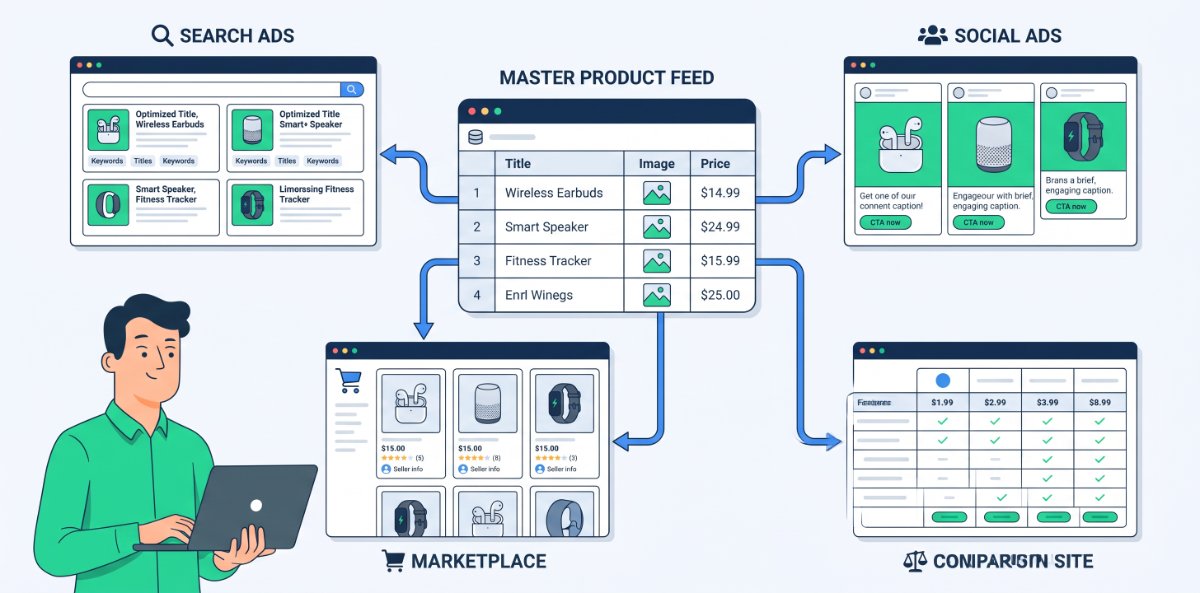
Selling across Google, Meta, Bing, Amazon, and other marketplaces should grow revenue, not chaos. The reality in most teams is the opposite. Each platform wants a slightly different version of your data, campaigns are built ad‑hoc, and the “master feed” is anything but. Multi‑channel success comes from treating your catalog as a single source of truth, then transforming it intelligently for each channel instead of hand‑editing everything.
This post outlines how to run multi‑channel feeds in a way that is scalable, accurate, and sane.
Step 1 - Build one clean master feed first
If the master is messy, every channel will be messy in its own way. Before worrying about platform nuances, get one feed right.
Your master feed should:
- Contain every sellable product once, with unique, stable IDs.
- Have complete core fields such as title, description, price, availability, brand, category, and image links.
- Use consistent naming conventions for brands, categories, colours, sizes, and other key attributes.
- Include extra business fields you care about such as margin, lifecycle stage, and internal product type.
Think of this as your product “brain”. All channel feeds should be transformations of this, not entirely separate, hand‑edited lists.
Step 2 - Decide what each channel is actually for
Not every product belongs everywhere. Trying to push your entire catalog into every platform is a fast way to waste spend and hit limits.
For each channel, define:
- Role: discovery, remarketing, bottom‑funnel purchase, or marketplace.
- Product fit: which ranges resonate there and which do not.
- Price and margin reality: can this channel support your economics for certain products.
You might push your full catalog to a marketplace, but only high margin or best selling segments to paid social. This decision should live upstream in your master feed, via labels or flags, instead of being reinvented per channel.
Step 3 - Map categories and attributes by channel
Every platform has its own taxonomy and attribute expectations. Your job is to translate your internal structure into theirs without losing meaning.
Work through:
- Category mapping from your internal categories to each channel’s category list. Use the closest specific match, not a generic “other” wherever possible.
- Attribute requirements: which fields are mandatory or strongly recommended for each platform such as gender and age for apparel, GTINs for Google, brand for marketplaces.
- Formatting quirks: for example, how sizes must be expressed, or which colour names are accepted.
Document these mappings so you are not reinventing the wheel every time the catalog expands.
Step 4 - Use rules to create channel‑specific feeds from the master
Manual exports and edits for each channel are where teams lose their minds. Instead, think in terms of rules.
Typical transformations:
- Field selection: choose which master fields populate each channel field.
- Value mapping: convert internal values to platform‑friendly ones, for example mapping “Blk” to “Black”.
- Title variations: generate slightly different titles per channel, respecting character limits and style rules.
- Exclusions: filter out products that should not appear on a given platform based on flags such as low margin, restricted brand, or stock constraints.
Once these rules are in place, channel feeds update automatically as the master feed changes.
Step 5 - Respect each platform’s creative and policy quirks
Multi‑channel does not mean one size fits all. Each platform has both hard rules and soft preferences.
Examples:
- Some channels disallow promotional text such as “free shipping” in titles or images.
- Image requirements differ: white backgrounds vs lifestyle shots, minimum sizes, no overlays.
- Character limits for titles and descriptions vary, so truncation and ordering matter.
Bake these into your channel transformations so you are not constantly firefighting disapprovals and mismatches.
Step 6 - Keep pricing and stock in sync everywhere
Nothing erodes trust faster than price or stock inconsistencies between a listing and your site.
To minimise that risk:
- Update price and availability in your master feed as close to real time as your systems allow.
- Ensure downstream feeds for all channels refresh frequently enough to reflect changes.
- Have alerts for when a channel’s listings and your site go out of sync beyond an acceptable threshold.
The more channels you run, the more vital this becomes. It is not just a user experience issue; it can also trigger policy actions.
Step 7 - Use shared labels to compare performance across channels
If every platform uses different naming and grouping, cross‑channel analysis becomes guesswork. Shared labels solve this.
Useful cross‑channel labels:
- Category or product type.
- Margin band.
- Lifecycle stage such as new, core, and clearance.
- Strategic tags such as hero, test, and long tail.
Because these labels originate in your master feed, you can ask questions like “How do high margin hero products perform across Google, Meta, and marketplaces?” without manually stitching together mismatched structures.
Step 8 - Avoid channel specific “hacks” that break your master
It is tempting to hack your feed to please a single platform: cramming extra keywords into titles, stuffing brand fields, or overusing generic categories. Over time those hacks pollute the master and hurt other channels.
Before making a channel specific change, ask:
- Can this be done in a way that stays clean in the master and is only applied in that channel’s transformation?
- Is the short term gain worth the long term complexity?
Whenever possible, keep the master semantically clean and express hacks, experiments, or tweaks in the channel layer.
Step 9 - Make ownership and process explicit
Multi‑channel chaos often comes from unclear ownership. Decide who owns what.
For example:
- Product data quality and master feed structure owned by ecommerce or merchandising.
- Channel mappings, rules, and optimisation owned by performance marketing.
- Technical integration and sync reliability owned by development or operations.
Agree a review cadence where these groups check feed health, disapprovals, and performance together, rather than operating in silos.
A quick sanity check for multi‑channel feeds
You can use this to see how close you are to “multi‑channel without madness”:
- There is a single, documented master feed that all channels derive from.
- Each channel has a clear role and not every product is forced into every platform.
- Categories and attributes are mapped deliberately to each channel’s taxonomy.
- Channel feeds are built from rules, not manual copy and paste.
- Pricing and stock stay in sync with your site across all channels.
- Shared labels let you compare product and segment performance across platforms.
- No one is afraid to touch the feed because of unknown side effects.
When you reach that point, adding a new channel or scaling an existing one stops feeling like starting from scratch. Your product data becomes an asset that travels well, instead of a constant source of surprises.